LCARdS 2026.08.0
First and foremost, it cannot be said enough - thank you all for using LCARdS, reporting issues, and providing great feedback for improvements!
A rather large release packed full of fixes and features.
If you run MSD cards, please read the full notes before upgrading.
- Major MSD features, uplifts and fixes (freeform
shapes, "shield generator", automatic line bundling ("trunk and branch" routing), animation reach intobase_svgand now across whole groups of overlays at once...) - Full HA media library integration and new assets
- Custom sound schemes
- Standardised condition logic across all systems
- Revamped animation preset engine and performance enhancements
- a long list of reliability fixes and other improvements
There's also a little treat in the animations and backround effects docs for some in-context testing 🖖🏼
Potential (likely) Breaking changes...
...particularly with MSD
- MSD had a lot of major updates and bug fixes - worthwhile verifying existing MSDs function the way you expect (may require some updates)
- MSD line routing engine has had a huge round of updates, fixes, and enhancements. Line overlays
route: auto(the default) now always does full pathfinding - including obstacle avoidance, automatic line bundling (see trunking), and crossing avoidance. You may need to adjust some of your settings if line routes are not looking as you expect. See the new routing concepts page for more info. This is under refinement so quirks may be present - you can always fall back to traditional/manual line routing if needed. - Explicit multi-channel
route_channelschains are no longer routed in raw declared order - the router now finds the shortest valid ordering automatically, so a chain that was geometrically backwards may render a visibly different (corrected) path after upgrading. - Button
ranges:colours'aboveboundary is now strict>(previously>=), matching howabove/belowalready behave everywhere else (range colours,whileconditions, Rules Engine). If a range config relies on a value landing exactly on the boundary, double-check it still matches the range you expect. - The
grid-staggeranimation preset is removed. It did not actually stagger elements correctly, so very likely not being used. If you do havepreset: grid-staggerin an existing config, migrate to the workingstagger-grid(not a drop-in rename - field names and defaults differ.) See the Animation Preset Reference for the full migration table.
New Features
HA Media Library Integration and New Assets
LCARdS now has full HA media libary integration:
- New "Browse HA Media" picker available in card editors for background/texture images, MSD blueprints, and per-card sound overrides.
- LCARdS also publishes its shipped media (images, MSD blueprints, sounds) into the HA media library for use anywhere in HA.
New Assets:
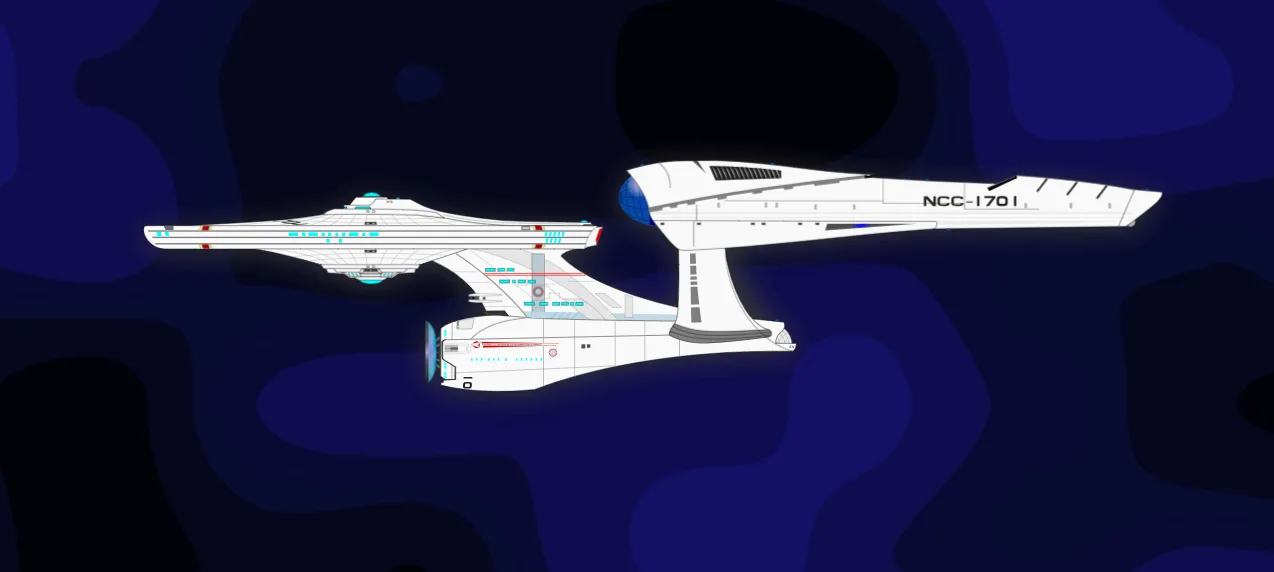
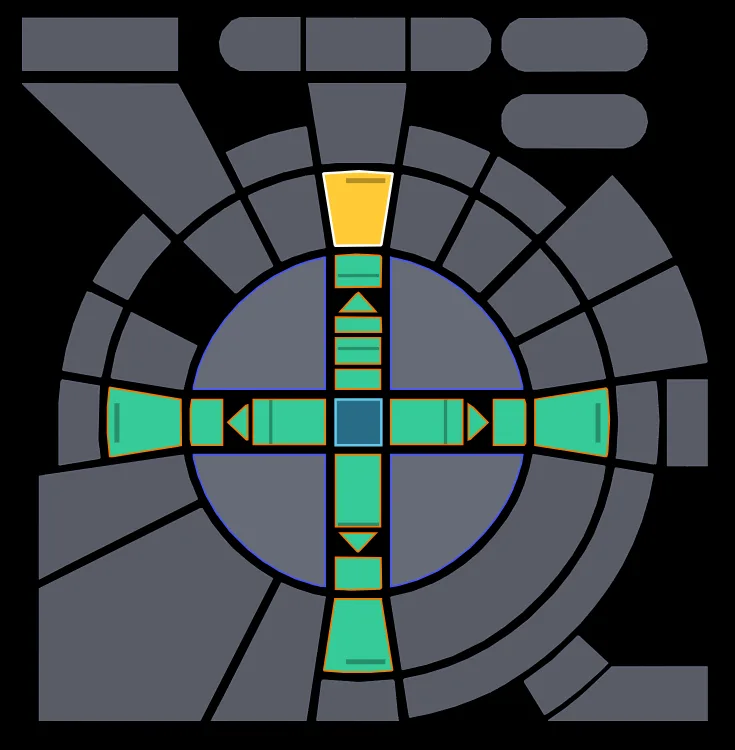
lcards-msd: new NCC-1701 ship asset for MSDslcards-button: fully configurable advanced d-pad component (individually addressable segments)
Custom Sound Schemes
You can now edit and save your own sound schemes:
- Pick from LCARdS-shipped sounds, or use your own with HA Media Library integration!
- Save, update, and delete custom sound schemes directly from the LCARdS Config Panel.
- Per-event sound overrides are now scoped to the scheme you're editing, instead of one flat list shared by every scheme.
Standardised Comparison Operators: >=, <=, and Between
New at_least / at_most (>=/<=) operators, plus inclusive and exclusive "between" are now available everywhere a condition is evaluated - range-based colours, while conditions, Rules Engine, and button ranges: presets. The animation and Rules editors both gained Between (inclusive) / Between (exclusive) options.
Docs: Interactive Live Playgrounds
The docs site now has a live, tweakable demo for every built-in animation preset, background animation, and CSS/SVG filter - no HA instance needed:
- Animation Preset Reference - animation presets
- Background Animation Preset Reference - canvas presets
- Filters Reference - CSS/SVG filter types
Each demo has real sliders/dropdowns/colour pickers, a live-updating YAML snippet you can copy straight into your config, and Replay/Reset-to-Defaults controls. Building these surfaced (and fixed) several real bugs - see below.
Animation Engine: Performance Enhancements, Editor & Preset Config Validation (#383)
- Huge performance gains in calculation-heavy animations (contour, plasma)
- Animation presets are now schema validated, catching bad configs before they cause confusing behavior.
- One consistent, schema-driven editor replaces the old bespoke preset-by-preset UI. Includes collapsible guides with YAML samples, added standard LCARdS colour pickers along with proper token resolution, and a proper code editor for advanced params.
- Embedded links on each animation to the preset documentation (which also has an animation playground to play with settings)
motionpathfor paths went from a non-functional placeholder to a real, working preset with a new "tracer shape" mode- Fixed a batch of presets that silently misbehaved (staggering, timelines, sequences, transforms); removed
border-pulse/scan-line, which never worked. - New
solidbackground-animation preset allowing for a basic tint layer. Useful for use behind your MSD blueprint without tinting the artwork itself. - The animation editor now surfaces
map_range- a powerful entity-reactive duration/delay/preset params. This is to raise your awareness for this YAML-only configuration.
MSD
MSD Studio: base_svg Element Animations, Easier Editing, Layering, Backgrounds & State-Based Line Colour (#383)
The MSD Studio got a ground-up pass:
- Animations can now target elements inside your blueprint SVG itself. You can animate portions of the
base_svgimage if you want. You can even match multiple as one definition (ie. target all<path>at once)
- Layering (z-index ordering #383): controls, lines, and backgrounds now paint in the order you configure.
- MSD now supports the standard background animation layer present in other cards. You can add background animations/images behind your blueprint. You can also choose to hide the blueprint outline if you only want to use it to derive anchor points.
- Lines are now state-aware! Change colour based on entity state (like buttons/elbows already do), use colour templates in line styles, and markers can inherit their line's colour/opacity and stay aligned to a thick stroke's edge.
- Controls can attach directly to other controls, with a visual 9-point picker showing exactly where the attachment lands.
- Configured attachment point is distinguished visually so you know exactly where the overlay is connected.
(New) MSD: Card-Level Bulk Overlay Animations
Building on base_svg element animations above - one animation declaration can now target a whole group of overlays at once, instead of repeating the same config on each one:
- New
msd.animations:- define an animation once, at the card level, and point it at a CSS selector matching multiple overlays. Perfect for something like Shield Bubble's segments (up to 16 individual polylines) - animate all of them together (draw-on, marching ants, pulse, etc.) with a single entry. - The animation editor's target picker gained ready-made bulk-select options - "All Lines/Shapes/Controls overlays," and an automatic "All
<prefix>_*overlays" option for any group of overlays sharing a naming convention (e.g. Shield Bubble'sshield_*segments) - no manual CSS selector writing required.
(New) MSD Shape Overlays: Free-draw shapes to create walls, rooms & zones on the Canvas (#389)
A brand new shape overlay type for freeform geometry, with the same styling power as the routable line overlays:
- Starting with three shape primitives: polyline (free-form lines) rect, and circle/ellipse - with dashed strokes, gradients, markers, and live state-based fill colour.
- Draw directly on the canvas with new toolbar tools, live preview, and grid-snapping, then drag points/handles to reshape.
- Lines can attach to shapes - corners, edges, or individual points - shown as clickable connection points in Connect Mode.
- Full animation and Rules Engine support like any other overlay, a new Shapes tab, and a reference doc.
(New) MSD: Shield Bubble (#389)
Buidling on the new shape overlay type - a new "Suggest Shield Bubble" tool in the Shapes tab will trace your ship's hull automatically and generates a shield outline. You can create one continuous path, or segment into any number of your choice - no manual point-placing required:
- Adjustable offset radius, corner-preserving simplification, and a roundness slider (blends toward a smooth oval) - all live-previewed and instantly tunable as you drag.
- Sections mode shares exact seams with no visible gaps, plus a start-angle control to rotate where the boundaries fall.
- Once saved as overlays - you can then edit them in same fashion as lines. Configure styles and animations, you can drag the points to new positions on the canvas and even add more points anywhere along the polyline.
(New) MSD: Automatic Line Bundling - "Trunk and Branch" Routing
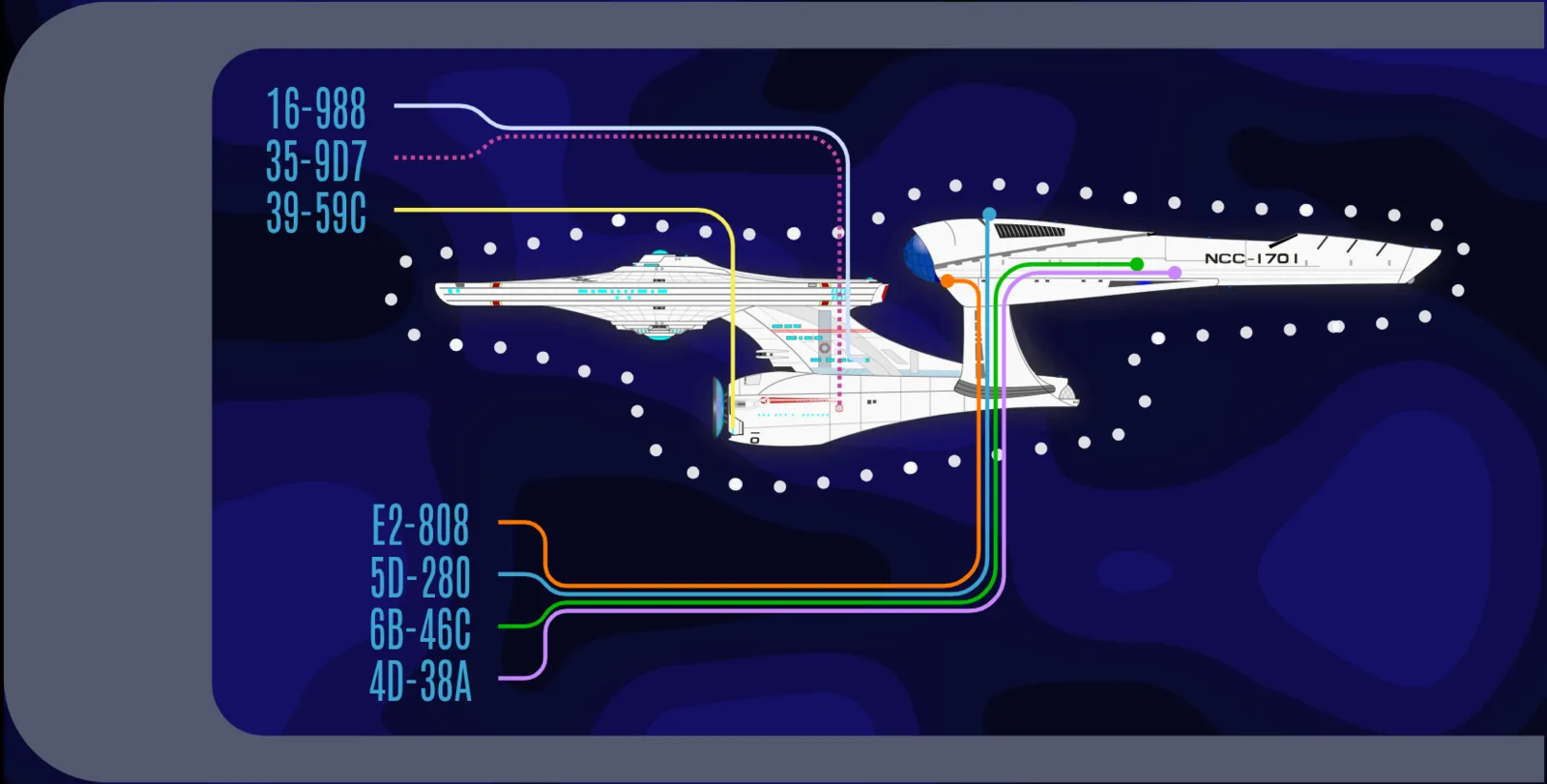
Lines that route and travel close to each other can now bundle together into a shared corridor and branch apart where their destinations actually diverge - like traces on a circuit board.
- Works for any line with route mode
auto(the default),smart, orgrid - Lines are also discouraged from cutting across each other's paths where a reasonable alternative exists, and corner rounding is now aware of neighbouring lines so two bundled lines' corners no longer overlap or squash each other.
- New per-line
corner_radius_mode(auto/forced) lets you choose between letting the router shrink a corner's desired radius to avoid an unnecessary detour or crossing (the recommended default), or always reserving full room for your configuredcorner_radiusregardless. - Corner rounding now also accounts for a line's own
style.width- thicker lines get a correctly tighter effective radius near their neighbours instead of rendering a squared-off inner edge. - Explicit routing
channelsstill work exactly as before, and now share the same bundling/lane machinery as automatic bundling, so the two compose naturally. - New Routing Grid and Discovered Trunks debug overlays (with toolbar toggles) in MSD Studio's canvas make it easy to see what the router decided.
- Tip: router grid size is determined automatically from your view_box dimensions. You can adjust this to change the coarseness of the router resolution.
- Studio's Routing tab reorganized, has more info, tips and explainers.
- See new Routing & Channels reference page, and a brand new MSD Quick Start guide walking through building your first MSD.
MSD Studio: Interaction & Editing Polish (#389)
A large batch of quality-of-life fixes and additions to the Studio canvas itself:
- New Edit Mode toggle (and
Ehotkey) for directly dragging/resizing controls, shapes, and channels on the canvas, with a live coordinate/dimension readout while you drag. - Click-and-drag drawing for shapes, routing channels, and Place Control - size them directly on the canvas instead of opening a form with a fixed default size.
- Click-to-insert a new point at the midpoint of any line or shape segment, instead of only being able to append points via drag or a form.
- Per-waypoint corner radius for manual-routed lines: [x, y, radius] waypoint override (round or bevel) - Studio gets a Radius field + canvas drag handle per corner.
- Bulk Edit Style: multi-select shapes/lines and restyle all at once (diff-based, only changed fields applied).
- Added per-overlay
lockedflag for controls/shapes (locks changes in the editor-only, no runtime effect). - Fixed resize handles that could drift or appear to get permanently "stuck" while shrinking a control, shape, or channel.
- Fixed Escape not reliably cancelling an in-progress draw, double-click adding a spurious extra point when finishing a polyline (Enter now also finishes one, alongside double-click), and shapes/lines staying visually selected after clicking empty canvas.
- Toolbar reorganized into labeled groups (Tools/Interaction/View/Overlays); raised the canvas zoom ceiling from 400% to 1000%.
- A round of dialog-scrolling, zoom-fit, and layout-overflow fixes across the Base SVG, Controls, Lines, Shapes, and Anchors tabs.
-Editing a control or line no longer duplicates it - edits now update the original in place as expected. - Live preview while editing a line now shows the real rendered result
- a general UX refresh - more organized and visible action bar, more consistent dialog styling, additional action buttons on items (like duplicate)
- Updated anchor harvesting, now supports named
<circle>/<text>/<g>/<ellipse>/<rect>elements in your SVG. - New toggles let you turn either anchor source off - handy for a noisy, auto-numbered SVG, or an asset where the computed landmarks aren't useful.
Reliability Improvements
Many reliability improvements on existing features...
- Alert-mode and entity-driven colours now update properly and in the right order (elimated flickering/racing)
- Entities bound to a specific
attribute(e.g. brightness) now update immediately when just that attribute changes - previously triggering only fired on a full state change. - Fixed
whileconditions with both anaboveandbelowbound only ever checking one of the two, not both. - Fixed animations tied to entity-change triggers occasionally duplicating instead of cleanly replacing themselves. (#386)
- Cards embedded in MSD
controloverlays now reliably stay in sync with Home Assistant - some setups (nested config, template-only entities, dynamically-matched entities) could previously stop updating after the first paint. A card's ownvisibility:condition also now works correctly when embedded as an MSD control, matching how it behaves everywhere else. (#387) Visibility tab is not present in the editor due to HA limitations - just add visibility conditions via YAML. - MSD attachment/routing fixes: attachment sides (
top/bottom/left/right) now resolve correctly instead of silently falling back to center; shape fill colours now update live along with their stroke colour; lines now correctly honorroute_hint/route_hint_lastin all routing modes; and routing now works correctly with custom or negative-originview_boxcoordinates. - MSD line-routing correctness verified by automated test suite (over 130 tests):
- Fixed a first-load-only false positive where MSD's heavier post-routing initialization could trip the background animation system's cold-start safety check, forcing an unnecessary 5-30 minute animation recovery backoff.
- Fixed a colour-configuration bug where two different overlays could end up sharing the same underlying colour object, causing an edit to one to unexpectedly bleed into the other.
- Fixed a long-standing bug where MSD's coordinate system (
view_box) could be computed inconsistently, causing overlays/anchors to be positioned using the wrong dimensions on some cards. Also fixed anchors misplacing themselves inside rotated/transformed SVG groups.
Other Fixes & Improvements
..and a slew of other bug fixes and small improvements
- New validation for background-animation and filter values, catching real config mistakes (e.g. an opacity value outside 0–1) and powering the new live docs demos.
- Fixed the
leveltexture/background effect renderingdown/leftidentically toup/right- all four directions now render correctly. - The
gridbackground animation'sdiagonal,hexagonal, anddotspatterns are now properly exposed in the editor, along with their sizing options. - Fixed the
imagebackground animation's docs, which referenced the wrong config fields. - Corrected several other doc inaccuracies: shape-texture wave directions, the
cascadepreset's timing units, andgridpattern documentation. - Removed the unused MSD
filter_presetsystem and the long-deadmsd.debugconfig option - both had zero effect on anything for some time. - Fixed colour resolution for theme tokens and CSS variables used inside SVG filters.
- Fixed sound/connectivity settings occasionally reading stale data on dashboard tabs that never opened the Config Panel.
- Fixed loading spinners rendering invisible across 13 places in the editor/panels (an underlying HA component was replaced).
- Fixed a
'none'sound scheme playing the first registered scheme instead of staying silent. - Fixed the
march(marching ants) animation preset producing a visible snap/jump at each loop restart on multi-segment dash patterns. Proper length is now calculated for seamless looping. - Removed a stale bundled SVG variant no longer shipped.
- Elbow: Added interactive: false flag (suppress hover color/animation, tap/hold still work) and a style.cursor override.
- Slider: Fixed jumpback: slider no longer resyncs from HASS mid-drag, so a poll/attribute update while dragging can't snap the value back before your own service call lands. (#392)
- Slider: Fixed vertical-mode value markers being offset by a nudge that was only meant for the horizontal preset's cross-axis.
All changes: 2026.07.02.1...2026.08.0